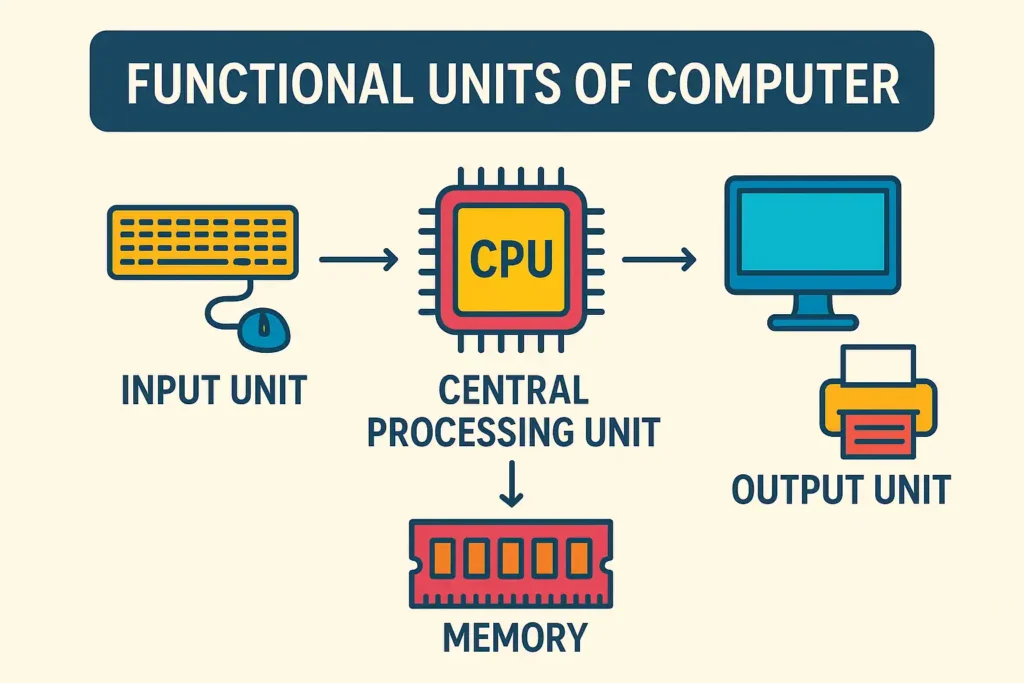
A computer works like a well-organized team, where each part has a clear duty and all parts depend on one another to complete a task. When people ask what are the functional units of a computer, they are really asking how data enters the system, how it is processed, how it is stored, and how results are delivered back to the user. In modern computing, the core idea is that a computer normally includes a processing element, memory, and control functions that coordinate operations.
Understanding these units is useful for students, beginners, and anyone who wants to build a strong base in computer studies. It also helps when learning hardware, software, or system design because the same basic structure appears again and again in different machines. Once you understand the purpose of each unit, the entire computer system becomes much easier to follow.
Introduction to the Working Structure of a Computer
A computer does not perform tasks in a random way. It follows a pattern. First, data is entered. Then it is processed. After that, results may be stored for later use or displayed for the user. This chain of work is what makes a computer dependable and fast.
The functional units are the parts responsible for that chain. Some units receive instructions and data. Some units interpret those instructions. Some perform calculations and logic decisions. Others store information temporarily or permanently. The output unit then presents the final result in a form that people can understand.
This division of work gives computers their power. Instead of one part trying to do everything, each unit focuses on a specific job. That is why computers can handle large volumes of data, complex instructions, and repeated operations with great speed and consistency.
The Main Functional Units of a Computer
The main functional units are commonly described as five connected parts: input unit, memory unit, arithmetic logic unit, control unit, and output unit. In many explanations, the arithmetic logic unit and control unit are grouped inside the central processing unit, which is often called the brain of the computer.
Each unit has a specific role:
- The input unit brings data and instructions into the computer.
- The memory unit stores information.
- The arithmetic logic unit performs calculations and logical operations.
- The control unit directs and coordinates all activity.
- The output unit presents the results.
These parts work as one system. If one part fails or is missing, the whole flow becomes weak or incomplete.
Input Unit
The input unit is the doorway through which data enters the computer system. It accepts raw information from the outside world and converts it into a form the machine can understand. Common input devices include the keyboard, mouse, scanner, microphone, webcam, and touchscreen.
This unit is important because a computer cannot do anything useful until it receives input. A keyboard can send text, a mouse can send movement and clicking signals, and a scanner can convert printed material into digital form. The input unit ensures that human actions become machine-readable data.
A good way to think about it is this: if the computer were a classroom, the input unit would be the student bringing questions and notes into the room. Without those questions and notes, there would be nothing to work on.
Input also includes instructions, not only raw facts. When you click a button, open a file, or tap a command, the input unit sends that signal into the system. That signal eventually reaches the control unit, which decides what should happen next.
Memory Unit
The memory unit stores data, instructions, and intermediate results. It acts like the computer’s working space. Some memory is temporary, while some is permanent. Temporary memory helps the system work quickly during active tasks, and permanent storage keeps files available for later use.
The most common idea behind memory is simple: a computer must remember what it is doing. When data enters the system, it may need to stay available while the CPU processes it. When a program is running, instructions must remain accessible. When results are produced, they may need to be saved before the output unit presents them.
Memory comes in different forms. Main memory is used for active work. Secondary storage keeps files for longer periods. Both types are important, but they serve different purposes. Main memory is faster and more directly connected to processing, while secondary storage is larger and more durable.
You can imagine the memory unit as the desk space where a worker keeps books, papers, and notes. The worker may not keep everything there forever, but the desk must be ready when needed.
Arithmetic Logic Unit
The arithmetic logic unit, often called the ALU, is the part that performs calculations and logical decisions. It handles arithmetic operations such as addition, subtraction, multiplication, and division. It also handles logic operations such as comparisons, condition checks, and decisions based on true or false results. The ALU is a fundamental building block of the CPU.
This unit is important because many computer tasks depend on numbers and decisions. When you use a spreadsheet, the ALU helps process formulas. When a program checks whether a password is correct, logic operations are involved. When the system compares two values and decides which is larger, the ALU is at work.
The ALU does not work alone. It receives instructions from the control unit and data from memory or registers. Then it produces a result and sends that result back for further use. In simple terms, the ALU is the mathematical and decision-making engine inside the computer.
For many learners, this is the most interesting unit because it shows that a computer is not just a storage device. It is an active problem-solving machine.
Control Unit
The control unit coordinates the whole system. It does not usually perform the calculations itself. Instead, it tells other units what to do, when to do it, and in what order. It manages the flow of instructions and makes sure every part works at the right time.
If the ALU is the worker who performs calculations, the control unit is the supervisor who gives directions. It fetches instructions, decodes them, and sends control signals to the memory unit, ALU, and input/output systems. This coordination is essential because computer tasks must happen in the correct sequence.
The control unit also helps prevent confusion. Imagine several tasks arriving at the same time. Without a control system, the computer would have trouble deciding which instruction to handle first. The control unit solves that problem by organizing the operation step by step.
This unit shows why computers are so reliable. They do not depend on guesswork. They follow controlled instructions with high precision.
Output Unit
The output unit sends the final result from the computer to the outside world. It converts processed data into a form that people can see, hear, or use. Common output devices include monitors, printers, speakers, and projectors.
This unit is the final stage of the flow. After the input is accepted, the data is processed and stored as needed, and then the output unit displays the result. If you type a document and see the text on the screen, the output unit is doing its job. If you print a report, the output unit helps transfer the result onto paper.
Output matters because data inside the machine is not useful unless it becomes understandable. A computer may process many values, but the user needs a visible result. That is why the output unit is such an important part of the full system.
How the Functional Units Work Together
The real strength of a computer does not come from one unit alone. It comes from the way all units cooperate. Data enters through the input unit. The control unit directs the process. The memory unit stores instructions and data. The ALU performs calculations and logic. The output unit presents the result.
This sequence can be seen in nearly every computer task. When you type a word, the keyboard sends input. The control unit manages the action. Memory keeps the text available while it is being edited. The ALU and control system work behind the scenes to help the software respond. Finally, the screen displays the text.
The same pattern appears in more advanced tasks too. When a computer processes a large spreadsheet, renders a graphic, or runs a program, the units still work together in the same basic way. That is what makes the functional model so useful for learning.
At this point, what are the functional units of a computer becomes easier to answer in one sentence: they are the coordinated parts that accept data, store it, process it, manage instructions, and produce output.
The Central Processing Unit as the Core
The central processing unit, or CPU, is usually described as the main processing part of the computer. In many explanations, the ALU and control unit are the two main components inside the CPU. Together they perform the essential processing work of the system.
The CPU is often called the brain of the computer because it handles the main instructions that keep the system active. It does not work in isolation, though. It depends on memory for data, on input devices for information, and on output devices for results.
A modern computer may also include specialized processors, but the basic idea remains the same. Processing must happen in an organized and controlled way. That is why the CPU is so central to the whole system.
When students first learn computer organization, the CPU often seems complicated. But once the control unit and ALU are understood separately, the CPU becomes much easier to picture.
Data Flow Inside a Computer
The way data moves through a computer is sometimes called the data flow. This flow is one of the best ways to understand the entire structure. Data starts outside the computer, enters through the input unit, is stored in memory, is processed by the ALU under the direction of the control unit, and then leaves through the output unit.
This flow is not always perfectly linear because computers can perform many tasks at the same time. Still, the basic order remains the same. That order gives the machine structure.
There are also moments when data moves back and forth between memory and the CPU many times during one operation. The control unit keeps the steps synchronized so that the system does not become confused. This is one reason computers can process large programs quickly.
If you think of the computer as a factory, data is the raw material that enters the factory. The functional units are the machines and supervisors that transform that raw material into finished output.
Why Functional Units Matter for Students
Learning the functional units of a computer is one of the best ways to begin studying computer fundamentals. It helps build confidence before moving into deeper topics such as operating systems, programming, networking, or architecture.
Students often memorize names without understanding their purpose. That method works for a short time, but it does not create real understanding. When each unit is learned through its role, the subject becomes clearer and easier to remember.
This topic also helps in examinations because questions are often based on definitions, functions, and differences between units. Once the student understands the flow, answering those questions becomes much simpler.
A strong understanding of these units also supports later learning in hardware troubleshooting and system design. Even simple computer use becomes more meaningful when the learner knows what is happening behind the screen.
Real-World Uses of Computer Units
The functional units are not only textbook ideas. They are used in everyday life and in many professional fields. In hospitals, for example, computers are used for records, scheduling, imaging, and monitoring, which shows how deeply computing systems are tied to organized work. BusinessToMark has a related article on this topic, What Is the Role of Computer in Hospital: Transforming Healthcare for Better Outcomes, which expands on practical computer use in healthcare.
In specialized environments, different systems are designed for specific jobs. That idea connects well with the article What Is Meant by a Dedicated Computer? A Complete Guide for Beginners and Professionals, which discusses machines built for focused tasks rather than general-purpose work.
These examples matter because they show that the same core units appear in many settings. The devices may be different, but the underlying structure is similar: input, storage, processing, control, and output.
Functional Units in Modern Computer Design
Modern systems may look very advanced, but the core structure is still rooted in the same functional idea. Whether it is a desktop, laptop, tablet, or another device, the essential work is still divided among units that receive data, process it, store it, and present results.
Modern architecture may include cache memory, special graphics hardware, and multiple processing cores. These additions improve speed and efficiency, but they do not replace the basic functional model. The original breakdown remains useful because it explains how the system works at the most important level.
This is why computer architecture is still taught using the classic functional structure. It gives learners a stable foundation before they move into more detailed topics. For a broader background, see computer architecture on Wikipedia.
Difference Between Memory and Storage
Many beginners confuse memory with storage, so this point deserves special attention. Memory is usually used for temporary working data, while storage is used for longer-term saving of files and programs. Both are important, but they do different jobs.
When you open a program, the data often moves into memory so the CPU can access it quickly. When you save a file, it goes to storage so it can remain available after the system is turned off. This distinction helps explain why the memory unit is connected so closely with processing.
A simple way to remember it is this: memory supports active work, while storage supports later use. The computer needs both to function smoothly.
The Role of Input and Output in Daily Use
Many people think input and output are the easiest units to understand, and in many ways they are. They connect the computer to the user. Input sends information in. Output sends results out.
Without input, a computer would have no commands to follow. Without output, the user would never see the result. That is why these units are essential even though they do not perform the main calculations.
Every time you press a key, move a mouse, speak into a microphone, or scan a page, you are using the input side. Every time you read a message on the screen, print a page, or hear audio, you are using the output side.
This human-machine connection is what makes computing practical. A computer may be powerful internally, but input and output are what make it useful to people.
Why the Control Unit Deserves Special Attention
Some learners focus mostly on the ALU because calculations seem exciting. Others focus on memory because storage sounds important. But the control unit is equally vital because it keeps the whole process organized.
The control unit ensures that instructions are carried out in the correct order. It helps the CPU fetch the right instruction, interpret it, and send the proper signals. Without this coordination, even a powerful processor would not function properly.
This is similar to how a conductor leads an orchestra. The musicians may be talented, but the music only sounds right when the timing is managed well. The control unit plays that timing role in the computer.
Understanding the control unit also helps explain why computers are so fast. They are not merely strong; they are organized.
A Simple Way to Remember the Functional Units
A memory trick can make the topic easier to remember.
Think of the computer as a workplace:
- The input unit collects the materials.
- The memory unit keeps the materials ready.
- The control unit gives instructions.
- The ALU does the actual calculation and comparison work.
- The output unit presents the final result.
This pattern is simple, but it captures the real structure. If you can remember the workplace idea, you can recall the role of each unit quickly during study or exam revision.
You can also think of it as a journey: input comes in, memory holds it, control directs it, processing happens, and output goes out.
Why This Topic Matters in Computer Science
The study of functional units is one of the first steps toward understanding how computers truly work. It supports later topics such as instruction cycles, system design, digital logic, and hardware organization.
For students planning to continue in computing, this foundation is especially helpful. BusinessToMark also publishes related educational material such as What to Do After BSc Computer Science: Best Career Paths, which can help learners think about the next stage after building basic knowledge.
A solid understanding of functional units also makes it easier to learn programming, because the student begins to see how software instructions are eventually handled by hardware.
Common Questions Beginners Ask
Many beginners ask whether the CPU and the computer are the same thing. They are not. The CPU is only one part of the computer, though it is a very important one.
Others ask whether memory is the same as storage. It is not. Memory is mainly for working tasks, while storage keeps data longer.
Another common question is whether the control unit performs calculations. It does not usually do the number work itself; that is the role of the ALU.
These questions are normal, and they show that the learner is trying to build a real understanding rather than just memorize terms.
Final Summary
The functional units of a computer are the parts that make the whole system work in an organized way. Input brings data in. Memory keeps it ready. The control unit directs the operations. The ALU processes calculations and logic. Output presents the results.
Once these five units are understood, the computer becomes much easier to study. The topic is not just theoretical; it is the foundation for understanding how modern machines process information every second. The same structure appears in simple computers and advanced systems alike, which is why the subject remains important for every learner.