In today’s digital-first business environment, data is one of the most valuable assets a small business owns. Customer records, financial documents, inventory information, employee files, marketing materials, and project data all need to be stored securely and accessed efficiently. Choosing the best data storage solution can improve productivity, strengthen security, and ensure business continuity during unexpected events.
However, with so many options available—including cloud storage, Network Attached Storage (NAS), external hard drives, and hybrid solutions—it can be challenging to determine which one best fits your business needs.
- 100% free
- Call direct
- Voice search
- Urdu & English
This guide explores the best data storage solutions for small businesses, comparing their features, benefits, drawbacks, and ideal use cases to help you make an informed decision.
Why Data Storage Matters for Small Businesses
Data storage is more than simply saving files. It directly impacts how efficiently your team works, how well you protect sensitive information, and how quickly your business can recover from disasters.
An effective storage system helps businesses:
- Protect critical business information
- Improve collaboration among employees
- Reduce downtime
- Prevent costly data loss
- Meet compliance requirements
- Support business growth
As businesses expand, their storage needs also increase. Investing in the right solution today can save significant time and money in the future.
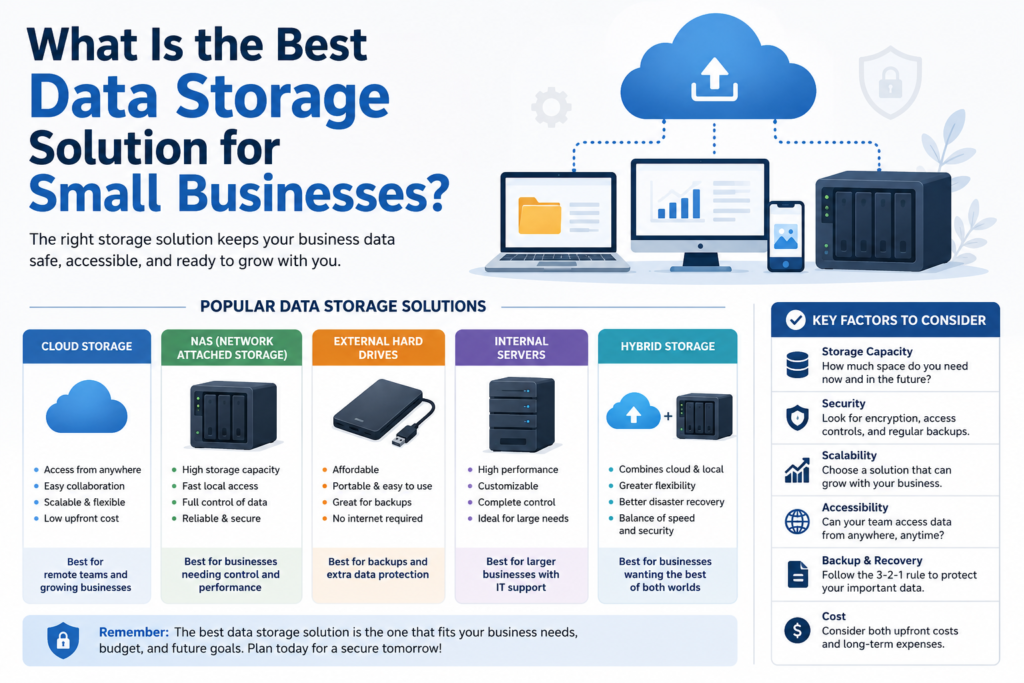
Types of Data Storage Solutions
Understanding the available options is the first step toward selecting the best storage solution.
1. Cloud Storage
Cloud storage keeps your files on secure remote servers accessible through the internet.
Popular providers include:
- Google Drive
- Microsoft OneDrive
- Dropbox Business
- Box
- iCloud Drive
Advantages
- Access files from anywhere
- Automatic backups
- Easy collaboration
- Scalable storage
- Low upfront costs
- Regular software updates
Disadvantages
- Requires reliable internet
- Monthly subscription fees
- Security depends on provider settings
Cloud storage is an excellent choice for businesses with remote employees or multiple office locations.
2. Network Attached Storage (NAS)
A NAS device is a dedicated storage server connected to your office network.
Employees can securely access files stored on the device without relying entirely on cloud services.
Advantages
- High storage capacity
- Faster local access
- Complete ownership of data
- Supports automatic backups
- Better performance for large files
Disadvantages
- Higher initial investment
- Requires maintenance
- Needs IT knowledge for setup
NAS is ideal for creative agencies, design studios, accounting firms, and businesses handling large files.
3. External Hard Drives
External hard drives remain one of the simplest storage methods.
They connect through USB or Thunderbolt and provide portable backup storage.
Advantages
- Affordable
- Easy to use
- Portable
- Fast data transfer
Disadvantages
- Easy to lose
- Limited sharing
- Vulnerable to physical damage
- No automatic remote access
External drives work best as secondary backup devices rather than primary storage.
4. Internal Business Servers
Many established businesses use dedicated on-site servers.
These servers store business data while allowing employees to access shared resources.
Advantages
- Complete control
- High performance
- Extensive customization
Disadvantages
- High purchase cost
- Maintenance expenses
- Requires dedicated IT support
- Higher electricity costs
Small businesses often find servers more expensive than cloud-based alternatives.
5. Hybrid Storage
Hybrid storage combines cloud storage with local storage.
For example:
- Daily work files stored on a NAS
- Automatic cloud backup
- External drives for offline copies
This strategy delivers speed, flexibility, and disaster recovery.
Factors to Consider Before Choosing a Storage Solution
Every business has different requirements.
Consider these factors carefully.
Storage Capacity
Estimate your current storage needs and expected future growth.
Businesses storing videos or design files need significantly more space than businesses managing mostly documents.
Security
Security should always be a top priority.
Look for features such as:
- Encryption
- Multi-factor authentication
- User permissions
- Activity logs
- Automatic security updates
Businesses handling financial or customer data require stronger security controls.
Scalability
Your storage solution should grow with your business.
Cloud providers make expansion simple by allowing businesses to upgrade storage plans without replacing hardware.
Accessibility
Ask yourself:
- Do employees work remotely?
- Do teams collaborate frequently?
- Do customers require file sharing?
Cloud solutions generally provide the easiest remote access.
Backup Options
Every business should follow the 3-2-1 backup rule:
- Three copies of your data
- Two different storage media
- One copy stored off-site
This dramatically reduces the risk of permanent data loss.
Cost
Compare both short-term and long-term costs.
Some solutions require:
- Hardware purchases
- Software licences
- Maintenance
- Monthly subscriptions
Choose a solution that balances affordability with reliability.
Best Cloud Storage Solutions for Small Businesses
Google Drive
Google Drive integrates seamlessly with Google Workspace.
Best for
- Small teams
- Collaboration
- Shared documents
Features include:
- Real-time editing
- Automatic version history
- Strong search capabilities
Microsoft OneDrive
OneDrive works exceptionally well for businesses already using Microsoft 365.
Benefits include:
- Office integration
- Automatic syncing
- Built-in ransomware protection
- Secure file sharing
Dropbox Business
Dropbox focuses on simplicity and collaboration.
Highlights include:
- Smart Sync
- Team folders
- Easy file recovery
- Third-party integrations
Box
Box offers advanced security features suited for industries with compliance requirements.
Ideal for:
- Healthcare
- Legal firms
- Financial services
Best NAS Devices for Small Businesses
Several NAS manufacturers dominate the market.
Popular choices include:
Synology NAS
Known for:
- User-friendly interface
- Excellent backup software
- Media management
- Business applications
QNAP NAS
Offers:
- High performance
- Virtual machine support
- Advanced networking
- Enterprise-grade features
Asustor NAS
A budget-friendly option providing:
- Reliable backups
- Good performance
- Easy setup
Cloud vs NAS: Which Is Better?
| Feature | Cloud Storage | NAS Storage |
|---|---|---|
| Upfront Cost | Low | Higher |
| Monthly Fees | Yes | No |
| Remote Access | Excellent | Moderate |
| Internet Required | Yes | Not always |
| Maintenance | Minimal | User-managed |
| Security Control | Shared | Full |
| Scalability | Excellent | Limited by hardware |
For many businesses, a combination of both delivers the best results.
How Much Storage Does a Small Business Need?
Storage requirements vary depending on industry.
Typical estimates include:
Freelancers
100 GB–500 GB
Small Office (5–10 Employees)
1–5 TB
Accounting Firm
2–10 TB
Marketing Agency
5–20 TB
Video Production Company
20 TB or more
Planning ahead prevents costly upgrades later.
Data Security Best Practices
Regardless of your storage solution, follow these essential practices:
- Enable multi-factor authentication.
- Encrypt sensitive files.
- Schedule automatic backups.
- Use strong passwords.
- Limit employee access.
- Update software regularly.
- Monitor login activity.
- Train staff on cybersecurity.
Good security habits often prevent more problems than expensive software alone.
Disaster Recovery Planning
Hardware failures, cyberattacks, and natural disasters can happen without warning.
Your disaster recovery plan should include:
- Daily backups
- Off-site storage
- Recovery testing
- Backup verification
- Emergency contact procedures
A tested recovery plan can reduce downtime from days to hours.
Common Mistakes Small Businesses Make
Many businesses unknowingly put their data at risk.
Avoid these common mistakes:
Relying on One Backup
Always maintain multiple backup copies.
Ignoring Security Updates
Outdated software creates security vulnerabilities.
Underestimating Future Growth
Choose storage that allows expansion.
No Employee Training
Many cyberattacks begin with phishing emails.
Using Consumer Storage for Business
Business-grade solutions offer stronger security, better support, and improved management tools.
Which Storage Solution Is Best for Different Business Types?
Retail Stores
Best option:
- Cloud storage with automatic backups
Accounting Firms
Best option:
- NAS plus encrypted cloud backup
Marketing Agencies
Best option:
- High-capacity NAS with cloud collaboration
Healthcare Practices
Best option:
- Secure cloud storage with compliance features
Remote Businesses
Best option:
- Cloud-first storage
Manufacturing Companies
Best option:
- Hybrid storage
Future Trends in Business Data Storage
Technology continues to evolve rapidly.
Emerging trends include:
- AI-powered storage management
- Intelligent backup automation
- Zero-trust security models
- Improved ransomware protection
- Edge computing integration
- Faster solid-state storage
- More sustainable data centres
These innovations will make storage systems more secure, efficient, and easier to manage.
Final Thoughts
The best data storage solution for a small business depends on its size, budget, workflow, and security requirements. For many organisations, cloud storage offers the ideal combination of affordability, flexibility, and ease of collaboration, making it an excellent choice for remote and growing teams. Businesses that need faster local access, greater control over sensitive information, or large storage capacities may benefit from a Network Attached Storage (NAS) device. A hybrid approach—combining local storage with secure cloud backups—often provides the strongest balance of performance, resilience, and disaster recovery.
Whatever option you choose, prioritise data security, automatic backups, scalability, and user-friendly access. Investing in a reliable storage solution today will help protect valuable business information, improve productivity, and support long-term growth in an increasingly digital world.