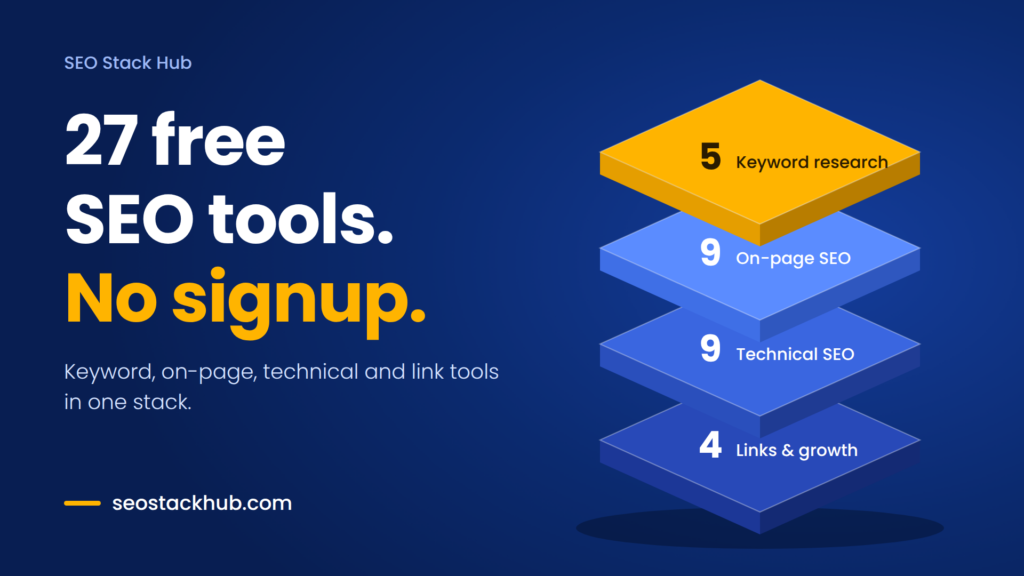
Free SEO tools with no signup are easy to find. The hard part is knowing which to use, in what order, and where they stop being enough. This guide shows you how to build a full workflow from keyword idea to published page to live backlink, without creating a single account.
Why most “free SEO tools” lists let you down
Search for free SEO tools and you will find hundreds of lists. Open a few and a pattern appears.
- 100% free
- Call direct
- Voice search
- Urdu & English
Many of them call a tool free when it is really a free trial. Others hand you two or three searches a day and then ask for an email address. Some give you a checklist only after you enter your details. And almost all of them are catalogs: a tool name, a screenshot, a short paragraph, then the next tool. Nobody tells you what to do first, what to do next, or when a free tool simply won’t be enough.
That is a problem because SEO is a sequence of jobs, not a pile of tools. You choose a topic, check what searchers actually want, write the page, clean up the technical side, earn a few links, and measure what happened. Each step needs a different tool, and switching between ten unrelated websites, each with its own signup wall, wastes the time free tools were supposed to save.
This guide takes a different approach. It organizes 27 free, browser-based tools by the job they do, explains when to use each one, and is honest about what free tools cannot do. The tools come from SEO Stack Hub, a free toolkit built around one idea: stop switching tabs. Everything listed here runs without an account, according to the site.
What “no signup” actually means (and why it matters)
A no-signup tool has no account, no email, and no password. You open the page, paste your text or URL, and get a result.
This matters for four practical reasons:
- You get your answer in seconds instead of confirming an email first.
- Client drafts, unpublished headlines and staging URLs stay out of someone’s marketing database.
- No usage traps.Tools with a daily search cap push you toward a paid plan. Tools without an account have nothing to lock.
- Easy sharing.You can send a link to a teammate or client and they can use the same tool immediately.
The tradeoff is real, though. A no-signup tool cannot remember your history, track rankings over time, or crawl your whole site. We will come back to that in the limits section.
The SEO workflow in five stages
Think of your SEO work as five stages. The 27 tools below fit into them like this:
- Keyword and intent research
- On-page writing and optimization
- Technical setup
- Links and growth
- Measurement
Let’s go through them in order.
Stage 1: Keyword and intent research (5 tools)
Good SEO starts before you write a word. You need to know what people search for, and more importantly, what they expect to find.
Search Intent Checker labels each keyword as informational, commercial, transactional or navigational. This is the most skipped step in SEO and the most common reason a good page never ranks. If searchers want a comparison and you publish a product page, Google will usually show them comparisons instead.
Free Keyword Finder gives you a starting list of ideas around a seed topic.
Long-Tail Keyword Generator turns one seed keyword into dozens of questions, modifiers and comparisons. Long-tail phrases are less competitive, and they are where new websites usually win first.
Keyword Grouper takes a messy list and groups it by shared words, so you can plan one page per topic instead of ten pages fighting for the same search. That problem is called keyword cannibalization, and it quietly holds back many small sites.
Keyword Density Checker shows how often your terms appear in a draft. Use it as a sanity check, not a target. Google does not reward a magic percentage, and stuffing keywords makes writing worse.
How to use them together: generate long-tail ideas, group them into topics, check the intent of each group, then write one page per group.
Stage 2: On-page writing and optimization (9 tools)
This is where a draft becomes a page that is clear to readers and easy for search engines to understand.
Headline Analyzer scores your title so you can compare versions before publishing. A clear, specific headline helps both clicks and rankings.
Meta Description Optimizer scores a description out of 100 for length, focus keyword, call to action and numbers. A meta description does not directly boost rankings, but it shapes whether someone clicks your result.
Google SERP Snippet Preview shows how your title and description may look in search results, so you can catch truncation before it goes live.
URL Slug Generator creates short, clean URLs. Keep them readable and avoid stuffing them with extra words.
Readability Score Checker flags dense sentences. Google’s guidance asks for helpful, people-first content, and plain writing is part of that.
Duplicate Content Checker compares two articles or URLs and highlights matching sentences. It is useful when several writers contribute, or when you suspect your page overlaps too heavily with another.
Live Word & Character Counter gives live counts and reading time. Use word count to check coverage, not to chase a number. A page should be as long as the topic needs.
Text Case Converter and Duplicate Line Remover & Text Cleaner are small utilities that save a surprising amount of time when you are cleaning keyword lists, headings or exported data.
Stage 3: Technical SEO (9 tools)
Technical SEO is the plumbing. If it is broken, great content may never be found or indexed properly.
Robots.txt Tester checks whether your rules block pages you want crawled. One wrong line can hide an entire site from search engines, so test before you deploy.
Sitemap & Meta Structure Generator helps you build a sitemap and the basic meta tags that guide crawlers.
Schema Markup Generator produces structured data, which helps search engines understand what a page is about. Always validate the output and only mark up content that is actually visible on the page.
301 Redirect Generator converts old and new URLs into Apache .htaccess or Nginx rules. Use it whenever you change a URL, so visitors and link value follow the page to its new address.
Hreflang Tag Generator creates language and country tags, including x-default, for multilingual sites. Mistakes here are very common, so a generator saves real headaches. There is also a dedicated hreflang guide if you want the background.
Open Graph & Twitter Card Generator controls how your page looks when someone shares it on social platforms. This matters on LinkedIn too: a clean preview gets more clicks.
Image Compressor & WebP Converter shrinks images and converts them to WebP. Heavy images are one of the most common causes of slow pages.
Domain Age Checker shows registration date, expiry and registrar. It is handy for vetting a domain before you buy it or request a link from it.
llms.txt Generator creates a file that points AI tools such as ChatGPT, Claude and Perplexity to the most important pages on your site. This is a newer practice. No one can promise it changes how AI systems treat your site, but it is a low-effort step that costs nothing to try, and few competing toolkits offer it.
Stage 4: Links and growth (4 tools)
Content earns trust, and links help search engines see that trust. This stage is also where free tools reach their limit, so be realistic about it.
Backlink Opportunity Finder builds ready-made Google searches that surface guest post pages, resource pages and roundups in your niche. It does the tedious query-writing for you. You still have to pitch and follow up.
UTM Link Builder tags your campaign links so analytics shows which post, email or social update actually sent the visitor.
SEO ROI Calculator estimates visits, sales and revenue from a target ranking, along with the return on your SEO budget. Treat the result as a planning estimate, not a forecast.
What Is My IP + VPN Leak Test is a utility for checking your public IP and whether a VPN is leaking it. It is useful when you check search results from different locations.
Where to get links when free tools aren’t enough
Finding opportunities is free. Earning the links takes outreach, writing and time. If you would rather buy that time, there are three places worth knowing, each with a different role:
- SEO Stack Hub’s guest post marketplacelists sites you can browse by DA, DR and traffic, with content writing included. Pricing and discounts change, so check the current listing before you order.
- RankNewlyis a guest posting and link-building marketplace. It writes the article, publishes it and sends you the live do-follow link. Its site describes plans for different budgets and a 12-month placement guarantee, which is worth reading closely before you commit.
- BusinessToMarkis a business, marketing and tech publication. If your topic fits its categories, its advertise page explains how to publish a guest post.
A word of caution that applies to all paid links: buy relevance, not just numbers. A link from a site in your niche with real readers is worth more than a high-metric site that has nothing to do with your topic. Google’s spam policies target manipulative link schemes, so choose placements a real reader could find useful, and avoid anything that looks like a link farm.
Stage 5: Measurement (free tools you still need)
Here is the honest part. The 27 tools above help you build and prepare. To measure results, you also need data that only search engines can give you.
Set up these free accounts, even though they require signup:
- Google Search Consoleshows which queries and pages actually get impressions and clicks.
- Google Analyticsshows what visitors do after they land.
- Bing Webmaster Toolscovers Bing and the search products connected to it.
These are first-party sources, and no third-party tool can replace them. Use the no-signup tools to do the work, and Search Console to find out whether the work paid off.
A local angle: don’t forget citations and listings
If your business serves a city or neighborhood, ranking is not only about your website. Consistent business listings help people and search engines find you.
CityKaam is a free local directory for Pakistan (with UK and USA options too), where people find plumbers, electricians, AC technicians, tutors, beauticians and shops by city and area, then call or message on WhatsApp directly. You can add your business for free. Treat a listing like this as one useful signal among many, not a ranking trick. A complete profile with an accurate name, address, phone number and description makes you easier to find and easier to trust.
A simple weekly routine using the stack
If you want a repeatable process, try this:
- Monday, research.Generate long-tail ideas, group them, and check intent. Pick one topic.
- Tuesday and Wednesday, write.Draft the page. Test the headline, check readability, and look at your snippet preview.
- Thursday, technical.Compress images, add schema, check your robots.txt, and confirm your sitemap includes the new URL.
- Friday, promote.Use the backlink finder to build a short outreach list. Tag your shared links with UTM parameters.
- Next month, review.Open Search Console and see which queries brought impressions. Update the page based on what you find.
This takes the stack from a bookmark folder to an actual habit.
The honest limits of free, no-signup tools
Trust is built by saying what a tool cannot do, so here it is:
- They don’t track rankings over time.For that you need Search Console or a paid rank tracker.
- They don’t crawl your whole site.A full site audit needs a crawler.
- They don’t replace judgment.A readability score cannot tell you whether your advice is correct, and a keyword tool cannot tell you whether your page deserves to rank.
- They don’t build links by themselves.Finding an opportunity is the easy part.
- Estimates are estimates.Any ROI or traffic projection depends on assumptions you supply.
For a new site or a small business, free tools cover a large share of day-to-day SEO tasks. As you grow, you may add paid tools for rank tracking and competitor data. You don’t need them on day one.
Common mistakes to avoid
- Writing before checking intent.The page can be excellent and still miss what searchers want.
- Chasing a keyword density number.Write naturally, then use the checker as a safety net.
- Publishing several pages for the same keyword.Group first, then write.
- Changing URLs without a 301 redirect.You lose both visitors and accumulated link value.
- Ignoring images.Uncompressed images slow pages and hurt user experience.
- Buying links by metrics alone.Relevance and real readership matter more.
- Never opening Search Console.Without real data, you are guessing.
Frequently asked questions
Are these SEO tools really free? According to SEO Stack Hub, all 27 tools are free and run in your browser with no signup. Check the site for current details, since offers can change.
Can free tools replace Ahrefs or Semrush? Not completely. Free tools handle writing, on-page and technical tasks well. Large-scale rank tracking, backlink databases and competitor analysis are where paid platforms add value.
How long does SEO take to show results? It varies by competition, site age and content quality. Many sites see early movement within a few weeks and stronger results over several months, but nobody can promise a specific timeline.
Do I need backlinks to rank? For competitive topics, usually yes. For low-competition long-tail topics, a well-matched, helpful page can rank with few links.
Is llms.txt required? No. It is an emerging convention, not a requirement, and its effect is not guaranteed.
Final thoughts
Free SEO tools work best when they follow a process. Research the intent, write for the reader, fix the technical basics, earn relevant links, and measure with real data. The 27 free tools at SEO Stack Hub cover the first four steps in one place, with no accounts and no tab-hopping. Bookmark the toolkit, follow the weekly routine for a month, and let Search Console tell you what is working.
Which of these tools do you use most? Share your own free SEO stack in the comments.
