In modern digital workflows, using more than one computer at the same time has become increasingly common. Developers often run different operating systems side by side, designers switch between workstations, and remote professionals juggle laptops and desktops throughout the day. For years, Synergy has been a popular tool that allows users to control multiple computers with a single keyboard and mouse. However, changing user expectations, licensing models, and technical limitations have led many people to search for a reliable Synergy alternative.
This in-depth article explores what Synergy does, why users look for alternatives, the types of solutions available today, and how to choose the best option for your specific needs.
Understanding Synergy and Its Role
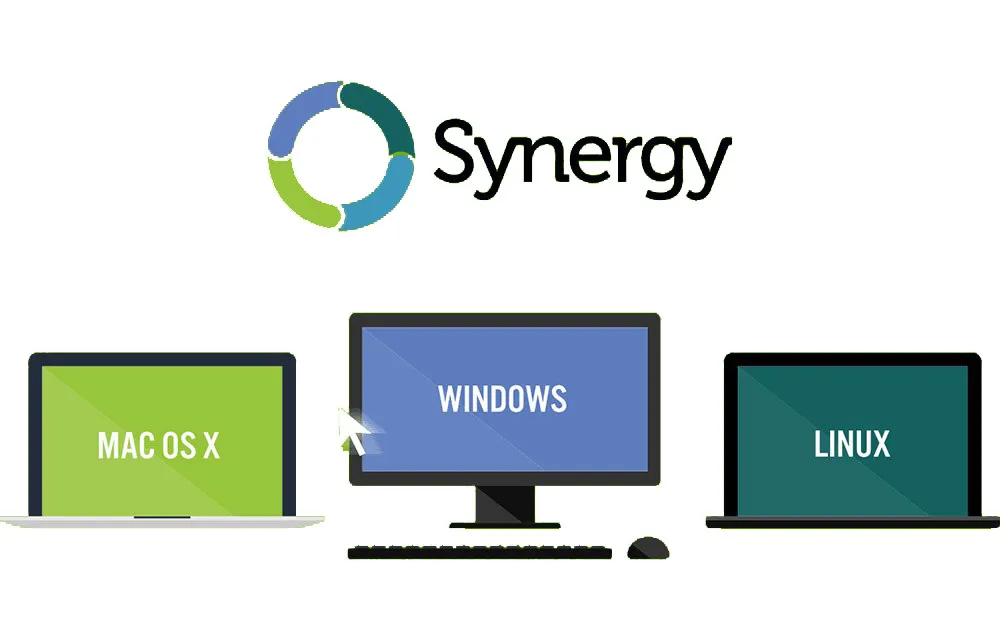
Synergy is a software-based keyboard and mouse sharing tool that enables seamless control across multiple computers connected on the same network. Once configured, users can move their cursor from one screen to another as if they were part of a single extended desktop, even when the machines run different operating systems such as Windows, macOS, and Linux.
Despite its usefulness, Synergy is not a perfect solution for everyone. Some users experience lag, others find the setup process complex, and some prefer tools with modern interfaces, stronger security, or different pricing models. These concerns have fueled the growing interest in finding a Synergy alternative that better fits modern workflows.
Why Users Look for a Synergy Alternative
There are several common reasons people begin searching for alternatives to Synergy:
-
Licensing and Cost Issues
Synergy moved from being free and open-source to a paid model, which discouraged users who prefer free or community-driven software. -
Performance Limitations
Latency, cursor stutter, or clipboard delays can disrupt productivity, especially in high-resolution or multi-monitor setups. -
Complex Configuration
Non-technical users may find Synergy’s setup process confusing compared to newer tools with automatic discovery. -
Security Concerns
In professional environments, encryption and secure authentication are essential, and some users feel Synergy does not meet enterprise-grade security expectations. -
Infrequent Updates
Users often seek alternatives that are actively maintained and optimized for the latest operating systems.
What Makes a Good Synergy Alternative?
Not all Synergy alternatives are created equal. A strong replacement should improve on Synergy’s weaknesses while retaining its core strengths.
Key features to look for include:
-
Cross-Platform Compatibility: Support for Windows, macOS, and Linux at a minimum.
-
Low Latency Performance: Smooth mouse movement and instant keyboard response.
-
Clipboard Synchronization: Ability to copy and paste text, images, and sometimes files.
-
Secure Connections: Encrypted data transmission and safe device pairing.
-
Simple Setup: Minimal configuration and intuitive interfaces.
-
Reliability: Stable performance during long work sessions.
Software-Based Synergy Alternatives
Software alternatives are the most direct replacements for Synergy. These tools use network connections to share input devices between computers.
Advantages:
-
Flexible and scalable
-
No additional hardware required
-
Often support advanced features like file transfer and gesture controls
Disadvantages:
-
Dependent on network stability
-
Can introduce latency over Wi-Fi
-
May require firewall configuration
These tools are ideal for users who frequently switch between machines and want a seamless, desktop-like experience.
Hardware KVM Switches as a Synergy Alternative
A KVM (Keyboard, Video, Mouse) switch is a physical device that allows one keyboard, mouse, and monitor setup to control multiple computers.
Why choose a KVM instead of Synergy?
-
Zero software configuration
-
Extremely low latency
-
Works without a network connection
-
Higher security, since no data is transmitted over a network
Limitations:
-
Typically more expensive
-
Less flexible for dynamic setups
-
Limited or no clipboard sharing
KVM switches are often preferred in enterprise environments, data centers, or security-sensitive workplaces.
Remote Desktop Tools as an Alternative
Remote desktop applications are not exact replacements for Synergy, but they can function as an alternative in certain scenarios.
Instead of sharing input devices directly, these tools allow one computer to control another through a remote session.
Best use cases:
-
Remote access across locations
-
IT support and troubleshooting
-
Occasional secondary machine access
Drawbacks:
-
Higher latency compared to direct mouse sharing
-
Requires full-screen or windowed sessions
-
Not as seamless for daily multitasking
For users working across different networks or geographic locations, remote desktop solutions can still be a practical Synergy alternative.
Open-Source vs Paid Synergy Alternatives
Choosing between open-source and paid solutions is a major decision when replacing Synergy.
Open-Source Alternatives
-
Free to use
-
Community-driven development
-
Transparent codebase
-
Highly customizable
Challenges:
May lack polished interfaces, consistent updates, or official support.
Paid Alternatives
-
Professional UI and onboarding
-
Dedicated support teams
-
Regular updates and bug fixes
-
Advanced security features
For businesses and power users, paid Synergy alternatives often provide better long-term reliability and productivity.
Choosing the Right Synergy Alternative for Your Workflow
The “best” Synergy alternative depends heavily on how you work.
-
Developers: Prefer low latency, Linux compatibility, and keyboard-centric workflows.
-
Designers: Need smooth cursor movement, multi-monitor support, and high-resolution display handling.
-
Remote Workers: Value easy setup, stability over Wi-Fi, and secure connections.
-
Enterprises: Require encryption, centralized management, and compliance-friendly solutions.
Understanding your priorities makes it much easier to narrow down the right option.
Security Considerations When Switching
Security is often overlooked but critically important. Keyboard and mouse sharing software transmits sensitive input data across devices.
Before choosing an alternative, consider:
-
Whether data is encrypted
-
How devices authenticate each other
-
If cloud services are required
-
Compliance with workplace security policies
For organizations handling confidential data, hardware-based or enterprise-grade solutions may be the safest Synergy alternative.
Migration Tips: Moving Away from Synergy
Switching from Synergy does not need to be disruptive. A few simple steps can help ensure a smooth transition:
-
Test the alternative on one or two machines first
-
Verify compatibility with your operating systems
-
Compare latency and stability under real workloads
-
Train team members if the interface differs significantly
-
Keep Synergy installed temporarily as a fallback
This gradual approach minimizes downtime and frustration.
The Future of Synergy Alternatives
As multi-device workflows continue to grow, Synergy alternatives are evolving rapidly. Future improvements are likely to include:
-
Smarter automatic device detection
-
Cloud-synced configurations
-
Better mobile and tablet integration
-
AI-assisted cursor switching
-
Deeper OS-level integration
These advancements aim to make multi-computer setups feel as natural and efficient as using a single machine.
Conclusion
A Synergy alternative can significantly improve productivity, comfort, and security in multi-device environments. While Synergy remains a well-known solution, it is no longer the only viable option. Today’s alternatives offer better performance, easier setup, stronger security, and more modern user experiences.
By carefully evaluating your workflow needs and understanding the strengths of different alternatives—whether software-based, hardware-driven, or remote-access solutions—you can confidently choose a Synergy alternative that supports your work today and adapts to your needs in the future.